
Messy TV guide data? We fix it. AI-matched program guides for your existing TV service.
Smart software that sits between the TV service you already subscribe to and your player, doing the heavy lifting so your player doesn't have to: AI matches every channel in your M3U playlist to seven days of TV guide (EPG) data from 50+ sources, and the built-in editor turns a messy channel list into a clean, ordered playlist in minutes.
Guide data for Live TV, Movies and Series — one login, every player.
We don't provide, host, or sell channels or streams — we organize the guide data for the service you already subscribe to.
channels indexed
programmes listed daily
EPG sources · 7-day guide
See it in action
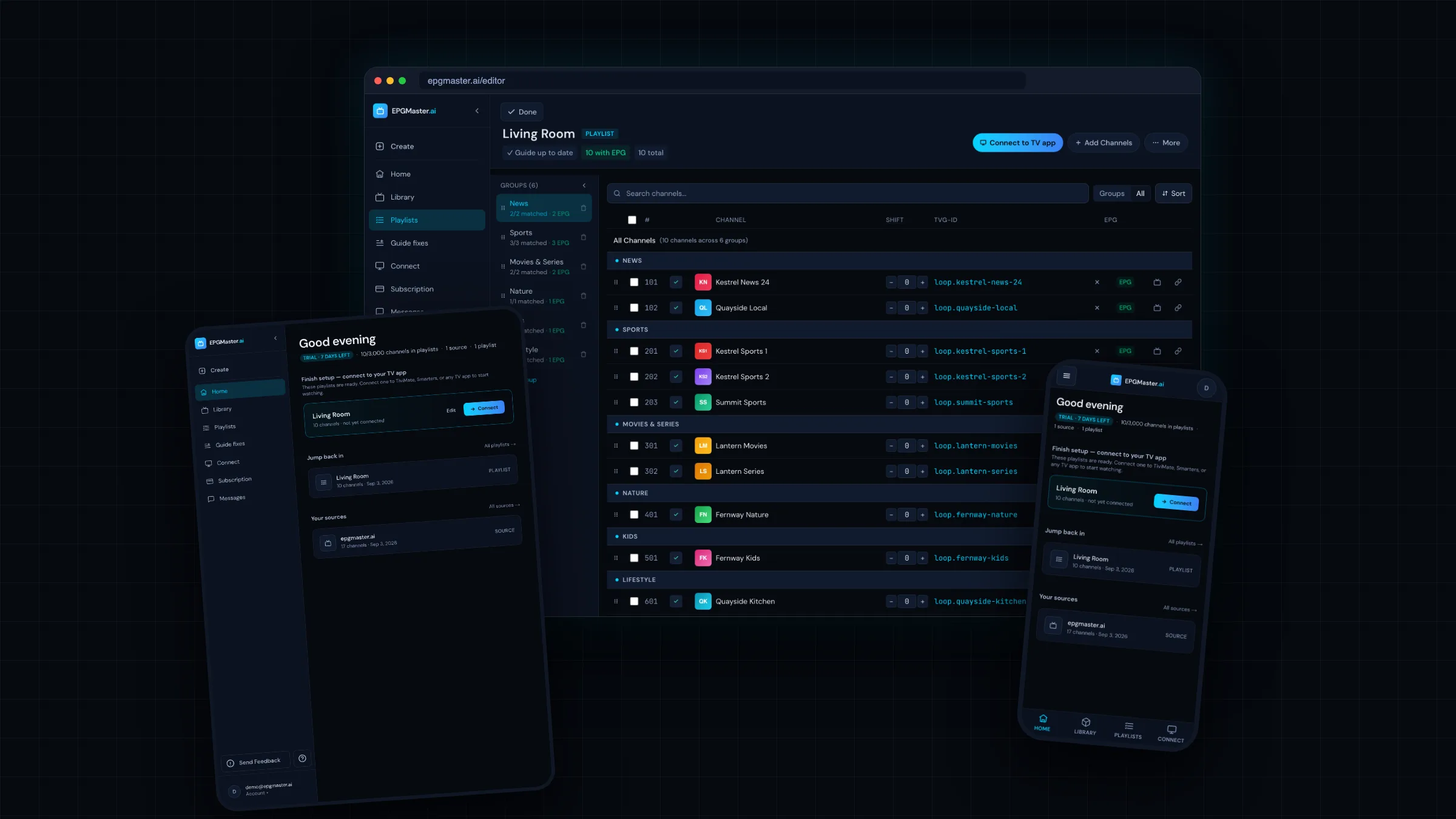
One playlist, every screen.
Match your channels, build your playlist, and read a full week of guide data — the same clean EPG on your desktop, tablet, and phone.
Watch it work
From provider dump to a real TV guide.
Sixty seconds, start to finish: a guide with nothing in it, your provider details pasted once, channels matching themselves to real schedules — and a full guide playing at the end.
Your provider gives you a mess. EPGMaster hands back a lineup that makes sense.
Point any player at your provider’s raw M3U and you get a wall of cryptic names — live TV, movies, and series all dumped together, no groups, no guide. Run it through EPGMaster first and the same feed arrives clean, grouped, and ready to watch.
- AI-matches every channel
- Strips the junk from names
- Groups TV · Movies · Series
- Adds a 7-day guide
The same 3,412-item feed on the left and the right. The only thing that changed is EPGMaster in the middle.
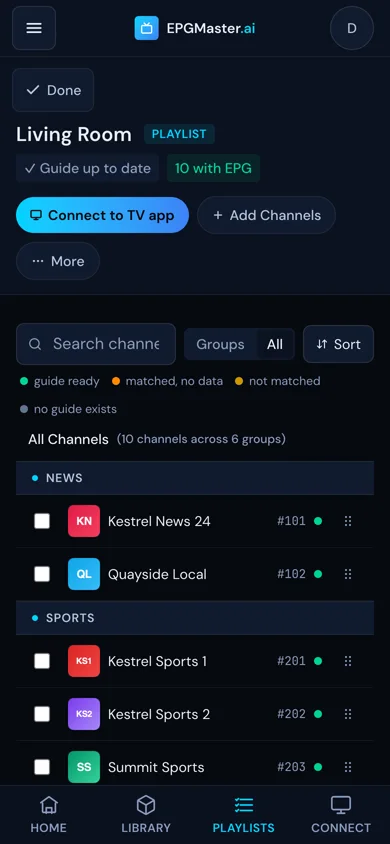
You organize it once. Every player shows exactly that.
That’s the actual EPGMaster editor on a phone — the same messy feed, now grouped into Local, Sports, and Entertainment, renumbered, and matched to a full guide (14 of 14 with EPG). Drag to reorder, rename, regroup right in your browser. Save once, and it lands on every player you connect.
One login. Your entire lineup.
Other EPG services hand you a guide file and wish you luck. EPGMaster also speaks the Xtream Codes API your player already understands: connect your existing subscription once, we rebuild the lineup metadata clean, and any player signs in with your EPGMaster login to get all of it — live channels with a real guide, movie details, and complete series listings. The video itself always comes from your own provider.
Live TV
Every channel, AI-matched to seven days of programme guide data from 50+ sources — in the order and groups you chose.
Movies
Your subscription’s movie catalog — tens of thousands of titles — organized with artwork, plots, and details your player understands.
TV Series
Complete season and episode listings, organized for TiviMate, Smarters, and every Xtream-capable player through your login.
And you decide what each playlist carries: TV only, movies, series — or everything. The bedroom TV doesn’t need the movie catalog. The kids’ list can skip late-night groups. Your playlist, your rules.
Casual Viewer
Tired of channels with no programme info? Upload your M3U and EPGMaster fills in everything — titles, descriptions, episodes, artwork. Works with TiviMate, Kodi, Plex, and every major player.
Power User
47,000+ channels indexed. Multi-source EPG from 50+ providers. AI matching with industry-leading accuracy on messy provider names. Drag-drop editor with bulk rename and grouping.
Home Server
Building a Plex, Emby, or Jellyfin setup with live TV? EPGMaster generates feeds formatted specifically for your platform — perfect XMLTV output.
Setting it up for others
Friends and family expect a working EPG and a sensible channel layout. Hand them a feed URL and let them edit their own playlist in the browser. No support tickets about M3U syntax.
Everything your TV guide should be
AI Channel Matching
Upload your M3U — our AI matches every channel to the correct programme guide in seconds. No manual TVG-ID hunting.
Multi-Source Aggregation
50+ EPG data sources combined. Fewer missing shows, better coverage than any single source.
Seven-Day Programme Guide
See what’s on across the next seven days. Plan recordings, check schedules, never miss a show.
Full M3U Editor
The editor M3U users have been asking for. Drag-drop reorder, bulk rename, custom groups, logo swaps, timeshift, hide channels. Organising a messy playlist is finally a 10-minute job, not an afternoon.
Xtream-compatible guide output — Live, Movies, Series
Connect your existing subscription via Xtream credentials (live re-sync, movie and series metadata). EPGMaster speaks the Xtream Codes API your player already understands — point TiviMate or Smarters at your EPGMaster login and it picks up your cleaned lineup and guide. The video itself always comes from your own provider.
How this works →Universal Player Support
TiviMate, Kodi, Plex, Emby, Jellyfin, Smarters, OTT Navigator, and 15+ more.
Finally, an M3U editor that doesn’t make you want to quit
Your provider dumps 3,000 channels in random order with names like UK|| KESTREL SPORTS 1 ᴴᴰ ⚽. You want 200 channels, sensibly named, in the groups you care about.
EPGMaster’s editor makes that a 10-minute job.
Drag-and-drop reordering
Arrange channels exactly how you want them in your player. Move groups, move channels, instant preview.
Bulk rename
Strip prefixes, emojis, and quality tags across hundreds of channels at once. Find-and-replace built for messy playlists.
Smart grouping
Create custom categories. Move channels between groups with one click. The taxonomy you wished your provider had.
Inline logo replacement
Swap broken or ugly logos without touching a text editor. Paste a URL, see it update in the editor and your player.
Timeshift controls
Set per-channel offsets for catch-up channels. Useful for time-zone-shifted feeds and delayed broadcasts.
Hide, don’t delete
Toggle channels off without losing them, in case you want them back. No more re-importing.
Every edit saves to your feed URL instantly. Your player updates on its next refresh. No re-uploading, no file juggling.
Why EPGMaster wins
Your provider login never appears in any file we generate
Most M3U tools print your provider username and password into every channel line — so anyone who sees the file can read them. We never do: you connect with a separate EPGMaster login you generate yourself — and can regenerate at any time.
http://provider:8080/live/yourname/yourpassword/1234.tsYour login sits in the URL, on every channel.
https://epgmaster.ai/get.php?username=m3c4-ybk6&password=hx7kp2mn&type=m3u_plusA login you generate — not your provider’s. Regenerate it any time, in one click.
Works with every player
XMLTV + M3U feeds optimised for each platform. One setup, every device.
Try EPGMaster.ai free for 7 days
Full access to every feature. No credit card required. Pick a plan when your trial ends, or walk away — no charge, no hassle.
Full access for 7 days · No credit card required
- Every feature unlocked during your trial
- Unlimited M3U libraries and playlists
- Movies & TV Series included — your whole lineup, one login
- 50+ EPG data sources
- AI channel matching
- Full drag-drop editor — reorder, rename, group, hide
- Xtream Codes native connection
- XMLTV + M3U feeds for every player
- Always-current guide data
- A full week of programme guide
Cancel anytime during your trial. No charges until you pick a plan.
Set up in 60 seconds
Connect your provider
Paste your Xtream Codes credentials, an M3U URL, or upload an M3U file. We support every provider format.
AI matches channels
Our AI engine matches every channel to the correct programme guide. 47,000+ channels in our database.
Edit, then point your player
Reorder, rename, and group channels in the browser. Paste your feed URLs into TiviMate, Kodi, Plex, or any player. Done.
Common questions
- Does EPGMaster provide TV channels, streams, or video?
- No. EPGMaster does not provide, host, sell, or link to TV channels, streams, or any video content. We organize electronic program guide (EPG) metadata for services you already legally subscribe to.
- What do I need to use EPGMaster?
- An existing TV service that gives you an M3U playlist or Xtream Codes login, and a player such as TiviMate, Kodi, Plex, Emby or Jellyfin. EPGMaster adds the guide data and cleans up the channel list.
- Where does the guide data come from?
- From 50+ licensed and public EPG sources, combined into one seven-day programme guide. Our AI matches each channel in your playlist to the correct guide entry.
- What does the Xtream-compatible login do?
- It lets your player read the cleaned playlist and guide from one login instead of two URLs. Playback always goes straight to your own provider. No video passes through EPGMaster.
- Do you store my provider password?
- Your provider login is used to read the channel list and is never written into any file we generate. Players connect with a separate EPGMaster login you can regenerate at any time.
Stop wrestling with M3U files and TVG-IDs.
Let us handle it.
Start your free 7-day trial and see why people are switching from manual setup to instant AI matching — and a real editor that fits in a browser tab.
Start Your Free TrialNo credit card required. Setup takes 60 seconds.